
Tuesday starts with a court calendar that has already changed twice. A client is waiting for a return call, a draft pleading needs formatting, intake notes sit in an inbox, and the lawyer is manually checking deadlines between hearings. The work is important, but much of it doesn't require the lawyer's judgment. It requires a reliable operating system around the lawyer.
That's where a legal virtual assistant earns a place. The right person isn't cheaper remote labor. They're a governed delegation layer, trained to move routine legal operations forward while the attorney retains responsibility for advice, strategy, approval, and client trust. The model is becoming a scaled part of legal services. The North American legal process outsourcing market was estimated at USD 10.19 billion in 2025 and is projected to reach USD 64.61 billion by 2034, with a projected 22.78% CAGR (Virtual Latinos' legal virtual assistant industry overview).
Table of Contents
- What a Legal Virtual Assistant Actually Does
- Core Tasks and Where the Ethical Lines Fall
- Legal VA vs In-House Paralegal vs General VA
- Integrating a Legal Virtual Assistant Into Your Team
- Confidentiality, Privilege, and Compliance Controls
- Using AI in a Legal VA Workflow Without Crossing the Line
- Measuring Whether the Engagement Is Actually Working
What a Legal Virtual Assistant Actually Does
By midmorning, the solo family lawyer has already spent time sorting three client emails, confirming a mediation, checking whether a filing was accepted, and moving a consultation because of an unexpected court appearance. None of those actions required legal analysis, but each one interrupted work that did. A capable legal VA can triage the calendar, log the intake details, format the pleading from an approved template, and place the relevant deadline into the firm's matter-management system.
That support changes the lawyer's day because it removes repeated context switching. The assistant doesn't decide whether the client has a viable claim or what position to take in negotiations. Instead, they make sure the information, documents, appointments, and reminders are organized before the attorney makes those decisions.
A legal virtual assistant is a remote professional with legal workflow fluency. They understand common legal terminology, document conventions, matter structures, confidentiality expectations, and the practical steps involved in systems such as Clio, MyCase, PracticePanther, or a court e-filing portal. A generic remote assistant may manage travel, invoices, or a general inbox. A legal VA should also know how to distinguish a client intake form from a pleading, a hearing date from an internal task, and a draft document from an approved filing.
The role is support, not substitution
The cleanest definition is simple: a legal VA supports attorneys and legal teams, but doesn't replace the attorney's professional judgment. That boundary should appear in the job description, the engagement letter, the firm's SOPs, and the assistant's daily workflow.
For firms evaluating the model, a useful overview of specialized support is virtual assistant for law firms. The most relevant capabilities include scheduling, intake coordination, document preparation, case administration, and research assistance, all performed within the firm's approved systems.
A firm should also document how remote work fits into its broader staffing model. GRIT's remote staffing guidance is useful context for thinking about ownership, communication routines, and the difference between adding a person and assigning an accountable function.
The practical test is this: if the task can be completed from a written procedure and still requires attorney review at the right point, it may belong with a legal VA. If completing it requires choosing a legal position, advising a client, exercising courtroom judgment, or making a professional-responsibility decision, keep it with the lawyer.
Core Tasks and Where the Ethical Lines Fall
Start with the task, not the job title. “Legal support” is too broad to govern safely, so divide the work into three categories before granting access or assigning a queue.
Safe to delegate with a written procedure
These tasks are usually operational and repeatable:
- Calendar administration: Pull hearing dates, consultations, filing deadlines, and internal reminders into the approved calendar.
- Matter organization: Create named folders, apply document conventions, maintain status fields, and identify missing administrative information.
- Template-driven documents: Populate approved forms or pleadings without changing legal substance.
- Exhibit preparation: Label exhibits, assemble indexes, apply consistent pagination, and prepare upload packages.
- Client intake: Send questionnaires, record responses, check for incomplete fields, and route the information for attorney review.
- Administrative filing support: Upload documents to an approved e-filing platform after the lawyer has confirmed the document, court, filing type, and submission instructions.
“Safe” doesn't mean unsupervised. It means the firm can define the inputs, the procedure, the output, and the point where a lawyer checks the result.
Requires attorney supervision
A legal VA may prepare a first-pass demand letter, index discovery, summarize a contract, or build a chronology from a case file. Those assignments can save substantial review time, but the assistant must work from explicit instructions and label the output as a draft.
The attorney should verify facts, citations, procedural assumptions, tone, and legal conclusions before the work reaches a client, opposing counsel, or a court. If the task involves legal research, the lawyer should also confirm the authority using the firm's approved primary sources and research process. For teams that need a structured memorandum workflow, firms can use Contesimal for better memos, but the resulting work still requires attorney review.
Lawyer-only work
Keep these decisions with the attorney:
- Legal advice or an assessment of a client's rights.
- Courtroom advocacy, witness examination, and appearances.
- Settlement recommendations and negotiation positions.
- Fee negotiations or changes to engagement terms.
- Signing pleadings, certifications, affidavits, or court submissions.
- Client communications that provide legal conclusions or commit the firm to a position.
ABA Model Rule 5.3 places responsibility on lawyers for supervising nonlawyer assistance, including ensuring that the person's conduct is compatible with the lawyer's professional obligations. The firm must also examine unauthorized-practice rules in every relevant jurisdiction, especially when a remote assistant supports matters involving multiple states.
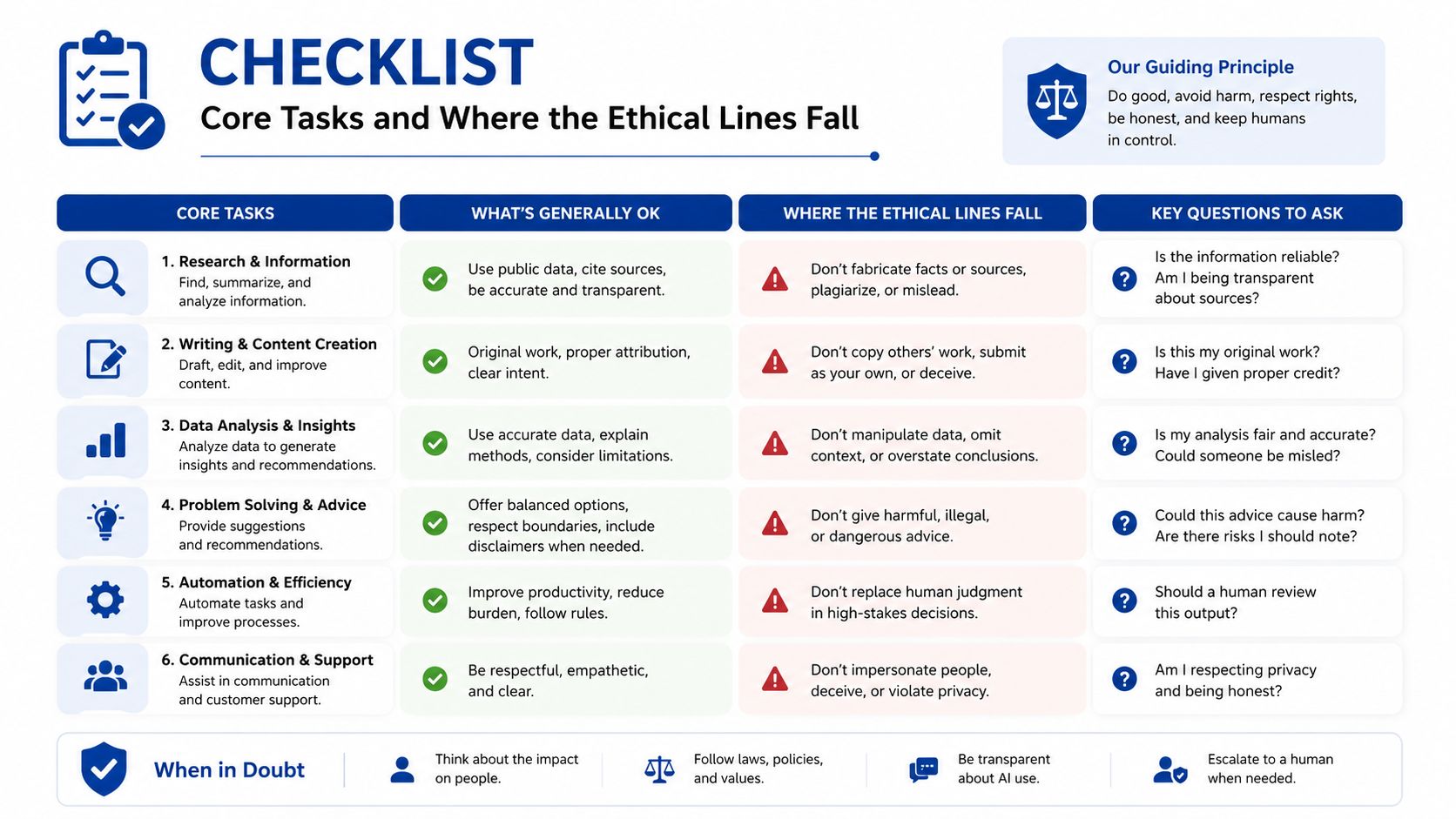
Practical rule: If a client could reasonably interpret the assistant's action as legal advice, the assistant shouldn't take that action independently.
Legal VA vs In-House Paralegal vs General VA
The three roles solve different problems. Treating them as interchangeable creates either unnecessary cost or unacceptable risk.
An in-house paralegal generally offers the deepest embedded legal knowledge. They may conduct substantive research, support deposition preparation, coordinate discovery strategy, and work closely with attorneys throughout the matter. The trade-off is a higher employment commitment, including salary, benefits, management, and office infrastructure.
A general VA is appropriate for general administration. They can manage travel, basic invoicing, meeting logistics, or nonconfidential business tasks. They usually aren't the right choice for e-filing, legal intake, matter organization, or document workflows that depend on legal terminology and confidentiality discipline.
A legal VA sits between those roles. They're more legally literate than a general assistant and usually less expensive and less embedded than an in-house paralegal. Their strongest use case is high-volume procedural and administrative work that doesn't require bar admission or independent legal judgment.
The brief doesn't provide verified hourly ranges, so a responsible comparison must avoid made-up prices. Instead, compare the options by total operating burden and task complexity.
Comparing Legal Support Roles
| Role | Typical Hourly Cost | Legal Training | Oversight Burden | Best-Fit Tasks |
|---|---|---|---|---|
| In-house paralegal | Varies by market, experience, and employment package | Deepest of the three, often with substantial practice-specific experience | Moderate, because the person is closely embedded in the firm | Substantive case support, research, deposition preparation, discovery coordination |
| Legal virtual assistant | Varies by specialization, arrangement, and scope | Legal terminology, procedural workflows, document handling, and confidentiality practices | Moderate to high at the beginning, then governed by SOPs and approval rules | Intake, scheduling, deadline tracking, document preparation, filing support, case administration |
| General VA | Varies by provider, geography, and task mix | General administration, not necessarily legal operations | High for legal tasks because the firm must teach and inspect the workflow | Travel, basic invoicing, general scheduling, nonconfidential administrative work |
Choose the in-house paralegal when the firm needs sustained substantive support and close collaboration on complex matters. Choose a general VA only when the work is nonlegal. Choose a legal VA when procedural volume is choking attorney capacity but doesn't justify assigning every task to a senior legal professional.
For firms comparing providers, GRIT's remote staffing company information offers a useful reference point for evaluating recruiting, onboarding, supervision, and ongoing support rather than looking only at an hourly quote.
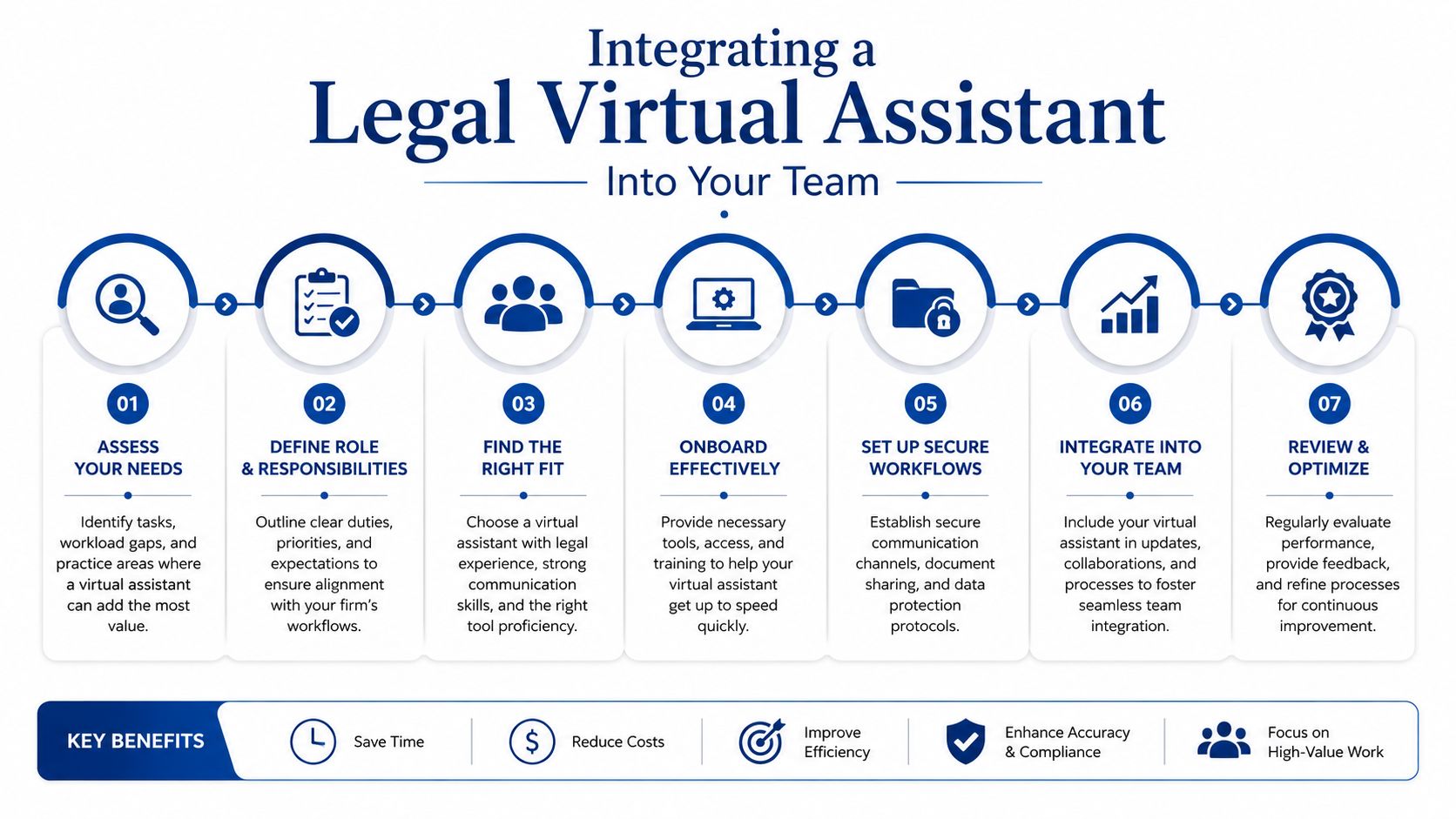
Integrating a Legal Virtual Assistant Into Your Team
The first mistake is granting broad access before defining the work. A legal VA should enter a controlled environment, not an open collection of client files.
Start with permissions and boundaries
Before any client information moves, complete the engagement letter, confidentiality terms, and any required NDA. Confirm the assistant's conflict-check obligations, approved work location, device expectations, and incident-reporting procedure.
Begin with read-only access wherever the platform allows it. Limit the assistant to designated matters, folders, calendars, and templates. Add write permissions only after the first week demonstrates that the assistant understands naming conventions, matter boundaries, and escalation rules.
The intake rules should answer practical questions:
- Which practice areas may the assistant support?
- Which clients or matters are excluded?
- Which document categories are permitted?
- Which communication channels are approved?
- What information must never be copied into personal tools?
- Who receives an escalation when the instructions are unclear?
Build the approval chain before assigning drafts
Every output needs a named reviewer. Correspondence may go to the responsible attorney, filing packages may require a second operational check, and client-facing messages may need approval before sending. Don't rely on “the lawyer will look at it later.” Put the approval status in the task system, document comments, or matter checklist.
A sensible first-month ramp looks like this:
- Week one: Shadow the firm, learn the practice-management system, and complete templated administrative tasks.
- Week two: Add supervised drafting, document formatting, intake logging, and controlled client follow-up.
- Week three: Expand into deadline tracking, filing preparation, and matter-status maintenance.
- Week four: Review work against the firm's SOPs, identify recurring errors, and revise permissions or procedures.
Firms that want to formalize this beyond one hire should treat the engagement as an outsourced business process, with defined ownership and measurable handoffs. GRIT's business-process outsourcing guidance provides relevant context for documenting those responsibilities.
Finish onboarding with three artifacts: a delegation matrix, a standing weekly check-in, and an escalation path for ambiguous questions. The matrix should identify the task owner, reviewer, system of record, required turnaround, and prohibited action for every recurring workflow.
Confidentiality, Privilege, and Compliance Controls
A confidentiality policy sitting in a shared folder won't protect a client. Controls protect a client. Managing partners should evaluate three separate risks: unauthorized disclosure, privilege complications, and unauthorized practice by a nonlawyer.
Technical controls must block casual leakage
Use managed devices or hardened endpoints, multifactor authentication on every legal application, encrypted file transfer, and approved document repositories. Prohibit personal cloud storage, consumer messaging for client matters, and downloads to unapproved devices.
Session logging and data-loss-prevention rules should help the firm identify or block client information leaving approved channels. Access should be matter-scoped, not based on a blanket account that exposes the entire practice.
Authoritative guidance for law firms using AI and related tools recommends zero data retention, no model training on client data, encryption, role-based access controls, documented usage logs, and vendor review (Clio's AI data privacy guidance). Those controls are relevant even when the assistant is using ordinary productivity software, because confidential material can move through email, storage, transcription, and automation tools.
Contract and workflow controls reinforce each other
The agreement should address confidentiality, conflicts, permitted systems, subcontracting, incident response, audit rights, jurisdiction-specific nonlawyer restrictions, and return or deletion of information. Contract language doesn't create privilege by itself. The firm must also show that it used a disciplined process.
| Risk | Technical Control | Contractual Control | Workflow Control |
|---|---|---|---|
| Confidential data leaves approved systems | MFA, encryption, managed endpoints, DLP rules | Approved-tool list, incident notice, audit rights | Matter-scoped access and named-client folders |
| Privilege is weakened by uncontrolled handling | Session logging and restricted downloads | Confidentiality and data-deletion obligations | Draft labels, watermarking, and attorney review |
| Assistant appears to provide legal advice | Role-based permissions and communication logging | Clear nonlawyer role and jurisdiction rules | Scripts, escalation rules, and no independent conclusions |
| Incorrect work reaches a client or court | Version history and access records | Defined responsibility for review and correction | Nothing leaves the VA without attorney approval |
The firm should watermark draft work product, keep client folders separate, and require the assistant to escalate unclear requests instead of improvising. The final approval must be attributable to the attorney, not inferred from a general instruction.
Privilege isn't earned by calling someone a contractor. It's supported by disciplined access, supervision, and handling procedures.
Using AI in a Legal VA Workflow Without Crossing the Line
AI can make a legal VA faster, but it doesn't make the VA or the lawyer less responsible. A platform-integrated legal AI assistant can help with routine drafting, document summaries, matter organization, and next-step prompts. Clio describes this type of integration as a way to reduce administrative friction and help firms scale revenue faster than headcount by reducing manual handoffs and preserving matter context (Clio's legal AI assistant overview).
The safe position is straightforward: AI is an amplifier, not an autonomous legal worker. Use it for first-pass summarization, chronology building, deposition-preparation indexing, exhibit reformatting, and administrative organization. Don't use it to make legal conclusions, recommend settlement terms, prepare unsupervised court filings, or send client communications without approval.
Require visible checkpoints
A firm's policy should require the VA to identify AI-assisted work. The attorney then verifies citations against primary authority, checks factual accuracy, confirms that no unauthorized legal advice appears in the text, and approves the final version before it reaches a client, opposing counsel, or a court.
A tool should never receive client data merely because it is convenient. The approved-tool list should identify which systems permit confidential information, which require an enterprise tier with zero retention and no model training, and which tools are prohibited altogether. Vendor review should cover retention, training, access controls, audit logs, deletion, and breach response.
For firms designing more complex automation, designing an AI workflow can help frame the system as a sequence of inputs, actions, checks, and handoffs instead of an unmonitored chatbot.
A short governance memo can state:
- Permitted uses: Summarization, chronology, indexing, formatting, and administrative organization.
- Required disclosure: The VA labels every AI-assisted draft.
- Attorney checkpoint: The responsible lawyer verifies facts, authorities, tone, privilege, and legal advice.
- Data rule: Only approved tools may process client information.
- Prohibited uses: Independent legal conclusions, settlement advice, unsupervised filings, or unapproved client communication.
- Recordkeeping: The firm retains the approval and relevant activity log.
That controlled-delegation model fits the profession's direction. The American Bar Association's 2025 legal industry report discusses growing personal use of generative AI among more than 2,800 legal professionals, while firm-wide adoption continues to face policy and ethical concerns (ABA Legal Technology Resource Center). Adoption should increase review discipline, not weaken it.
Measuring Whether the Engagement Is Actually Working
A legal VA engagement is working only when the firm can show what changed. Activity reports aren't enough. The operations lead should connect delegated tasks to lawyer time recovered, faster matter movement, quality, and financial outcomes.
Track four KPI families:
- Capacity: Compare attorney calendar audits before and after delegation. Record administrative hours removed from the lawyer's week and identify whether that time moved into billable work, client development, or strategic case preparation.
- Cycle time: Measure intake-to-response time, draft turnaround, filing preparation time, and the time required to assemble a complete matter package.
- Quality and compliance: Record missed deadlines, clerk rejections, incomplete intake records, incorrect matter placement, and approval flags raised during review.
- Financial performance: Review cost per matter, collections speed, realization impact, and the return associated with each delegated workflow.
Pull evidence from Clio or another practice-management dashboard, email timestamps, task histories, filing receipts, and calendar audits. Don't measure every possible activity. Pick the workflows that currently consume attorney attention or delay client service.
Legal VA Engagement Scorecard
| KPI Category | Metric | Target | Data Source |
|---|---|---|---|
| Capacity | Attorney administrative hours recovered | Set a baseline, then require a sustained improvement | Calendar audit and weekly time records |
| Cycle time | Intake-to-response and draft turnaround | Faster than the pre-engagement baseline without quality decline | Email timestamps and practice-management reports |
| Quality | Rework, approval flags, and filing errors | Declining corrections and no preventable deadline failures | Review logs, filing receipts, and task history |
| Financial | Cost per matter and realization impact | Positive contribution after review and management time | Billing dashboard and matter reports |
Set the baseline before delegation begins. If quality deteriorates, deadlines slip, or the attorney spends more time correcting work than the VA saves, trigger a 30-day reset conversation. Narrow the scope, revise the SOP, retrain the assistant, or end the workflow. The objective isn't to keep every delegated task. It's to preserve lawyer attention while improving operational reliability.
GRIT Virtual Assistants LLC supports small and midsize firms with remote legal and paralegal assistance across document preparation, scheduling, research support, filing coordination, and case administration. Visit GRIT Virtual Assistants LLC to discuss a governed staffing arrangement built around clear permissions, attorney approval checkpoints, and measurable workflow outcomes.