
A growing organization can have capable remote support and still lose hours every week. Processes live in scattered messages, follow-ups depend on memory, handoffs arrive without context, and nobody knows who owns the next decision. Adding another person to that environment doesn't solve the underlying problem. It often gives the same confusion to more people.
Strong remote staffing starts with usable standard operating procedures, not merely assigned tasks. A good SOP explains the trigger, sequence, owner, required access, quality standard, escalation path, and review rhythm. It gives a remote professional enough context to act independently while keeping sensitive decisions with the right internal owner.
The eight models below map practical staffing arrangements to those operating rules. They cover executive administration, sales, customer service, marketing, legal support, operations, and project delivery. Each includes a realistic use case, benefits, cautions, and implementation tactics. If you're building a recruiting workflow, you can also extract candidate data to organize information before assigning ownership.
GRIT Virtual Assistants LLC is one relevant example of AI-enhanced remote staffing. Its model combines human judgment with AI-supported research, drafting, documentation, and workflow automation. The evaluation lens throughout is simple: process clarity, secure access, escalation design, measurable outcomes, and the ability to scale without creating more managerial friction.
Table of Contents
- 1. AI-Enhanced Virtual Assistant Model
- 2. Executive Support and Leadership Delegation Model
- 3. Sales Operations Support Model
- 4. Customer Experience and Omnichannel Support Model
- 5. Marketing Operations and Content Coordination Model
- 6. Legal and Paralegal Support Model
- 7. Operations and Process Management Model
- 8. Project Coordination and Delivery Support Model
- Remote Staffing: 8-Model Comparison
- Choose the SOP That Removes the Biggest Bottleneck
1. AI-Enhanced Virtual Assistant Model
An AI-enhanced virtual assistant model works best when repetitive work consumes attention but still requires human judgment at key points. The assistant can research information, summarize documents, prepare drafts, organize data, and trigger workflow steps. A manager or specialist remains responsible for decisions, relationship-sensitive communication, and final approval.
For an executive team, the SOP might begin when a request arrives by email or form. The assistant classifies it, checks whether an existing template applies, gathers missing information, prepares a draft, records the task in Asana or a CRM, and routes the item to its owner. ChatGPT can support research and first drafts, while Zapier can move approved information between forms, spreadsheets, email, and task systems.
This model fits several operating environments:
- Executive administration: Calendar coordination, inbox prioritization, meeting preparation, and follow-through.
- E-commerce: Order-status research, return-ticket preparation, product information updates, and customer replies.
- Real estate: Listing research, lead organization, showing coordination, and inside-sales support.
- Legal administration: Document preparation, research summaries, and case-file organization, subject to attorney review.
The benefit isn't faster task completion. The assistant builds a repeatable layer between raw requests and expert decisions. The risk is automation without controls. AI-generated text can contain errors, expose sensitive information, or sound inconsistent with the business if nobody defines review rules.

Practical rule: Automate preparation and routing first. Keep approval, exceptions, and relationship-sensitive decisions with a named human owner.
Start with one workflow, document the inputs and approval points, and hold a weekly review to remove unnecessary steps. Teams comparing this approach with another local hire can use AI-enhanced remote support versus another local hire as a decision frame. Action step: Choose one recurring administrative process, record the current handoffs, and have the assistant run a supervised version before expanding access.
2. Executive Support and Leadership Delegation Model
Executive support fails when the assistant receives a calendar and inbox but no decision framework. A dedicated remote professional needs to know which meetings matter, which messages interrupt strategic work, and which commitments require immediate escalation.
Create a one-page executive brief covering communication preferences, priority contacts, recurring obligations, meeting rules, and categories of work the assistant can approve independently. For scheduling, Calendly can handle routine booking while the assistant manages exceptions, preparation, and conflicts. Inbox triage should use clear labels such as “respond,” “delegate,” “archive,” and “executive decision.”
The handoff SOP should identify four owners:
- Assistant: Reviews incoming requests, applies priority rules, prepares context, and updates the calendar.
- Executive: Makes decisions that affect strategy, clients, hiring, or sensitive commitments.
- Meeting owner: Supplies an agenda, required documents, and desired outcome.
- Escalation contact: Resolves urgent conflicts when the executive is unavailable.
A healthcare practice administrator might use this model to coordinate schedules across providers and prepare leadership meetings. A law partner could route matter deadlines and client requests through the same structure. A real estate broker might delegate showings and team meetings while retaining final control over high-value client relationships.
The operating rhythm matters as much as the task list. A brief weekly review can surface recurring conflicts, while a monthly delegation review identifies work the assistant can now own without approval. Share quarterly priorities so scheduling and inbox decisions reflect the executive's actual focus rather than isolated requests.
The assistant shouldn't become the executive's forwarding address. They should become the owner of a defined decision system.
Leadership delegation transfers gradually. The first phase may require daily confirmation, but the SOP should state which approvals can be removed as confidence grows. The first 30 days with a matched VA offers a useful ownership-transfer lens. Action step: Write the one-page executive brief, then delegate one calendar or inbox category with an explicit escalation rule.
3. Sales Operations Support Model
Sales operations support protects pipeline momentum when sellers are busy with conversations, proposals, and negotiations. The remote professional doesn't replace the salesperson. They keep records accurate, research contacts, prepare follow-ups, and make sure the next action has an owner and due date.
A useful SOP starts at a defined trigger. A new form submission, inbound email, completed call, or imported contact enters the workflow. The assistant checks required fields, applies the lead qualification template, researches missing company details, assigns the appropriate pipeline stage, and schedules the next approved action. Zapier or Make can automate CRM updates from forms and email, but the assistant should review exceptions rather than trust every automation blindly.
For a real estate team, the workflow might route buyer and seller inquiries into separate follow-up paths. A B2B SaaS team can use the same model to keep discovery notes, decision-maker details, and meeting outcomes visible. Insurance agencies and financial-services firms benefit when callbacks and prospect tracking follow a consistent cadence.
Define the following before work begins:
- Qualification owner: The salesperson or manager who sets the definition of a sales-ready lead.
- Data owner: The assistant responsible for CRM completeness and duplicate prevention.
- Follow-up owner: The salesperson responsible for the actual relationship conversation.
- Escalation owner: The sales leader who resolves stalled, sensitive, or high-priority opportunities.
Measure operational movement, not vanity activity. Track whether opportunities move to the next stage, whether assigned follow-ups are completed, and whether records contain enough context for the next conversation. A weekly pipeline review should examine aging opportunities and revise the cadence when prospects change behavior.
A clean CRM doesn't create revenue by itself. It prevents promising conversations from disappearing between meetings.
The model breaks when assistants are judged on messages sent instead of useful handoffs created. Use why sales follow-up slips when delivery gets busy to frame the ownership problem. Action step: Audit one pipeline stage, define its required fields and next-action rule, and assign one person to review exceptions every week.
4. Customer Experience and Omnichannel Support Model
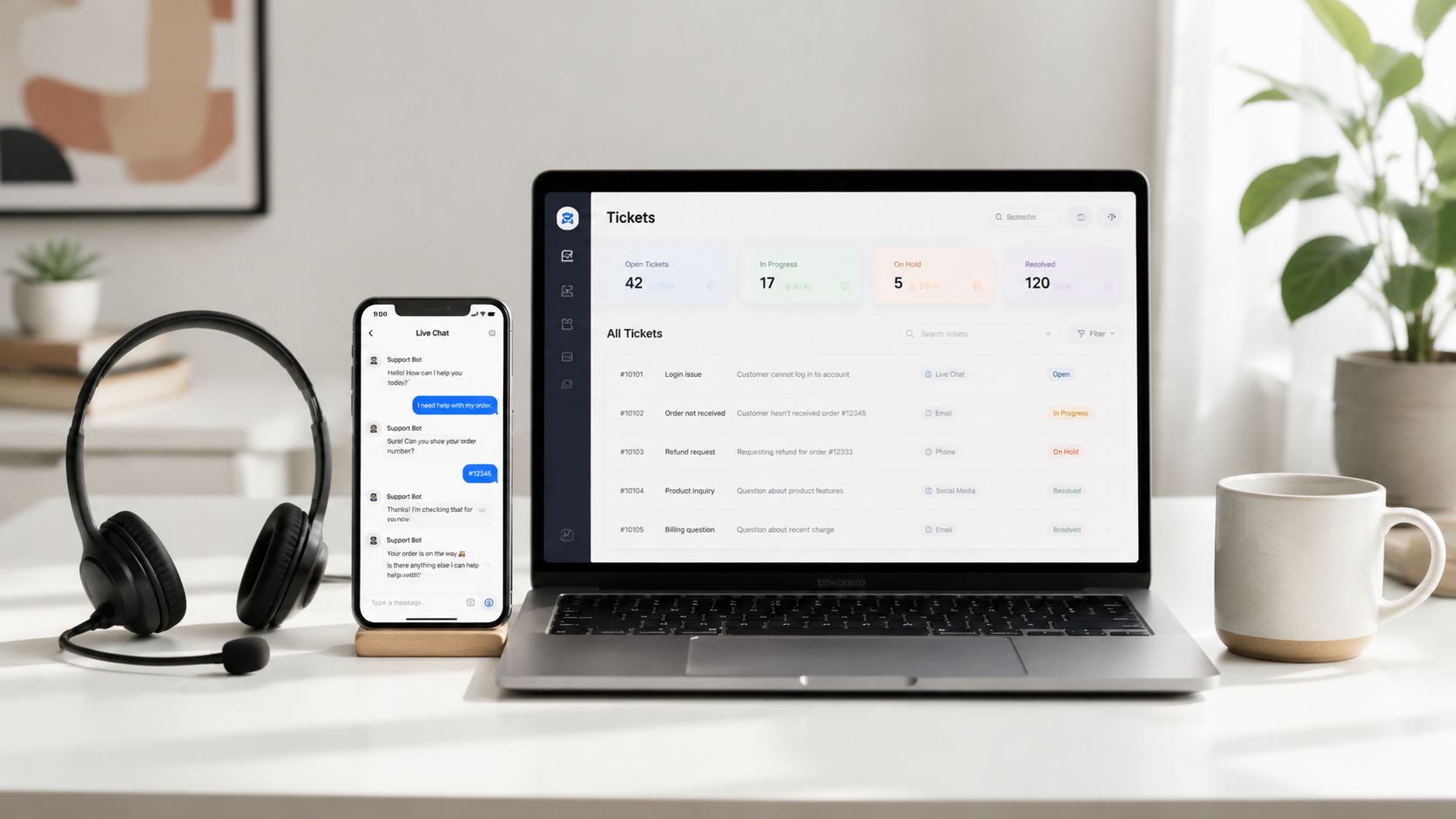
Customer support needs consistency across channels, not just availability. A remote staffing team can manage chat, email, phone coverage, and ticket triage when every interaction follows the same classification and escalation logic.
Build the knowledge base before assigning volume. The FAQ should answer routine questions in the company's approved voice, while a troubleshooting guide should show the exact diagnostic sequence. In Zendesk or Freshdesk, create categories for billing, scheduling, technical issues, returns, account access, and complaints. Each category should include a response template, required documentation, and an escalation destination.
Consider an e-commerce customer asking about an order status. The assistant checks the order system, confirms the delivery information, responds using the approved template, and closes or schedules the ticket. A telehealth practice needs a stricter boundary. The assistant can triage calls and portal messages, confirm appointments, and route billing questions, but clinical concerns must go to authorized healthcare staff.
A dependable support SOP defines:
- Channel owner: Who monitors chat, email, and phone queues during each coverage period.
- Resolution boundary: Which questions the assistant may answer without approval.
- Escalation threshold: The wording, risk, or customer situation that requires transfer.
- Quality reviewer: Who samples interactions and coaches the team.
- System owner: Who maintains helpdesk fields, macros, and reporting.
Response-time targets should be documented and reviewed weekly. Monthly interaction reviews can expose outdated answers, recurring complaints, and training gaps. Don't optimize only for closure speed. A fast but incomplete reply creates another contact and weakens customer trust.
Good escalation rules protect both the customer and the assistant. They make boundaries visible before pressure arrives.
Action step: Select the most common support category, write its approved response and escalation conditions, then review a sample of completed tickets with the internal specialist.
5. Marketing Operations and Content Coordination Model
Marketing operations support is a coordination role disguised as a production role. The assistant keeps campaigns moving by organizing assets, maintaining calendars, preparing channel updates, and routing work for approval. Strategic positioning and final creative judgment remain with the marketing owner.
Start with a brand guide that covers tone, audience, approved terminology, visual references, calls to action, and prohibited claims. Then create a campaign record in Asana or Monday.com with the brief, target channel, asset location, owner, reviewer, deadline, and publication status. The assistant should never have to search multiple inboxes to discover which version is current.
For a real estate team, the SOP may coordinate property photos, listing copy, social posts, email updates, and website changes. An e-commerce brand can use it for newsletters, product launches, and social scheduling. A B2B SaaS company might coordinate webinar invitations, reminder emails, nurture assets, and post-event distribution. A local service business can apply the same structure to Google Business updates and content publishing.
A practical approval flow looks like this:
- Brief owner: Defines the campaign objective, audience, and offer.
- Production coordinator: Creates tasks, gathers assets, and checks completeness.
- Subject specialist: Verifies technical or regulated claims.
- Brand reviewer: Confirms voice and visual consistency.
- Publisher: Releases the approved asset and records the live URL.
The main failure mode is treating the assistant as the final editor without giving them a documented standard. Another is allowing stakeholders to bypass the approval queue through direct messages. Keep one source of truth for requests and require late changes to carry a named approver.
A weekly campaign sync should review upcoming deadlines, blocked assets, pending approvals, and changes in priority. Action step: Build one campaign template with mandatory fields, an approval path, and a single folder structure before adding more channels.
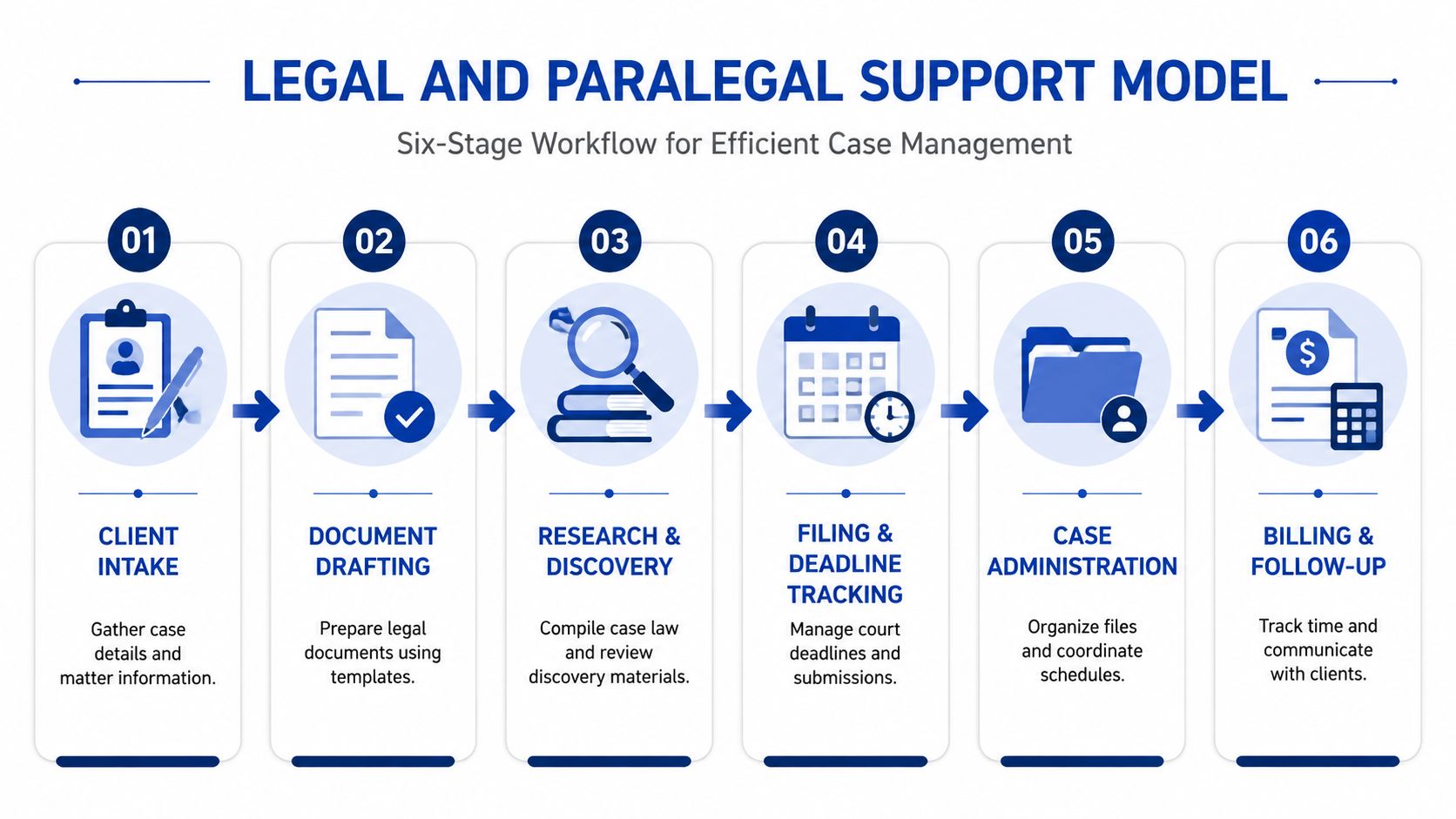
6. Legal and Paralegal Support Model
Legal support requires a sharper boundary between delegated administration and professional judgment. Remote paralegal staff can prepare documents, organize matter information, assist with research, manage scheduling, and track deadlines. Attorneys remain responsible for legal advice, strategy, final review, and decisions that require professional authority.
A matter-based SOP should begin at intake. The assistant creates the matter record, confirms required client information, applies the correct naming convention, saves documents in the approved folder, and records deadlines in Clio or Rocket Matter. Common document types should use controlled templates. Drafts need a review status that makes it impossible to mistake an assistant-prepared document for attorney-approved work.
Security is part of the workflow, not an onboarding footnote. Use secure document management tools such as Box, ShareFile, or Citrix, apply least-privilege access, and define how documents are shared, downloaded, retained, and destroyed. Confidentiality agreements and written security protocols should accompany the assignment.
A real estate law practice may use remote support to coordinate closings, assemble document packages, and track missing signatures. A family law practice may delegate discovery organization and document assembly. A small firm can use the same model for deadline tracking and client scheduling without giving the assistant authority to interpret law or communicate unapproved legal conclusions.
Weekly case reviews should cover:
- Upcoming deadlines: Confirm the responsible attorney and required preparation.
- Missing information: Identify the client, opposing party, or third party needed for progress.
- Draft status: Separate unreviewed, reviewed, and filed documents.
- Access exceptions: Remove permissions that are no longer necessary.
- Escalations: Route urgent or ambiguous matters to the supervising attorney.
Action step: Choose one matter type, define the assistant's permitted tasks and prohibited decisions, then test the SOP on a non-urgent file under attorney supervision.
7. Operations and Process Management Model
Operations staffing creates value by turning informal knowledge into a system other people can follow. The remote operations professional interviews stakeholders, maps the current process, identifies failure points, documents the future workflow, and coordinates improvements across functions.
Start with the most broken or business-critical process, not the easiest one. In an e-commerce company, that could be order fulfillment. In a professional services firm, client onboarding may be the bottleneck. A healthcare practice may need a repeatable intake process, while a real estate brokerage may need consistent listing and transaction procedures.
Map the workflow visually in Lucidchart or Miro before writing prose. Show the trigger, decision points, system updates, handoffs, exceptions, and completion condition. Frontline staff should review the map because they know where the documented process differs from what happens.
A strong process-management SOP assigns:
- Process owner: Accountable for the outcome and future changes.
- Task owners: Responsible for each step and its completion evidence.
- System owner: Maintains fields, automations, permissions, and templates.
- Escalation owner: Resolves exceptions that cross departmental boundaries.
- Review group: Approves material changes and removes obsolete steps.
Zapier can reduce manual movement between forms, email, task systems, and databases, but automation should follow process clarity. Automating a confusing workflow moves errors faster. Documentation should include screenshots, examples, exception handling, and a clear version date.
The same discipline applies when evaluating outsourcing workflows for content teams. Action step: Map one workflow from trigger to completed outcome, interview the people who perform it, and schedule a quarterly review for the finished SOP.
8. Project Coordination and Delivery Support Model
Project coordination support is most useful when project managers spend too much time chasing updates instead of resolving risks. A remote coordinator maintains the schedule, updates tasks, prepares status reports, records decisions, and keeps stakeholders aligned. The project manager still owns scope, trade-offs, quality decisions, and escalation of material risks.
Use one project-management system consistently. Asana or Monday.com may suit marketing and professional-services work, while Jira often fits software development. A project template should include milestones, dependencies, review gates, deliverable owners, acceptance criteria, and the location of final files.
For a software team, the coordinator can prepare sprint agendas, confirm ticket readiness, record decisions, and track release dependencies. A marketing team can use the model for campaign launches. Construction and renovation projects need vendor updates, material dependencies, and schedule changes captured in one place. Professional services firms can use it to coordinate multi-phase client engagements.
The handoff rules must be explicit:
- Task owner: Completes the deliverable and attaches evidence of completion.
- Coordinator: Checks status, records blockers, and updates stakeholders.
- Project manager: Resolves priority conflicts and approves scope changes.
- Client owner: Confirms external expectations and acceptance.
- Escalation owner: Makes decisions when risks affect budget, quality, or timing.
Hold a weekly status meeting with a consistent agenda. Review completed work, upcoming milestones, blocked tasks, decisions required, and risks that need action before the next meeting. The coordinator should send a concise summary immediately afterward, with each action tied to one owner and one due date.
Document lessons learned at project close, while the details are still available. Action step: Create a reusable project template, define the weekly status agenda, and require every risk to include an owner, next action, and escalation date.
Remote Staffing: 8-Model Comparison
| Model | Implementation complexity | Resource requirements | Expected outcomes | Ideal use cases | Key advantages |
|---|---|---|---|---|---|
| AI-Enhanced Virtual Assistant Model | Moderate, requires SOPs and AI integration | Human VAs + AI tools, secure remote infra, onboarding (3–5 days) | 10–30+ hours reclaimed; faster docs/research; cost savings (~up to 70%) | Administrative, sales, marketing, customer-facing tasks across SMBs | Blended human-AI speed, scalable, cost-efficient |
| Executive Support and Leadership Delegation Model | Low–Moderate, trust and access needed | Dedicated VA with email/calendar access, executive brief | Immediate time recovery for leaders; improved meeting productivity | Single executives or leadership teams (founders, partners) | Reduces decision fatigue; improves accountability |
| Sales Operations Support Model | Moderate, CRM processes and outreach rules | CRM access, training, sales tool integrations (HubSpot/Salesforce) | Healthier pipeline, fewer stale deals, better forecasting | Real estate, B2B SaaS, insurance, financial services | Frees sellers for conversations; improves follow-up and data quality |
| Customer Experience and Omnichannel Support Model | Moderate–High, 24/7 coverage and escalation flows | Helpdesk/chat/phone tools, training, SLAs, multilingual support | Faster responses, higher CSAT/NPS, improved retention | E-commerce, telehealth, SaaS, healthcare practices | Consistent omnichannel support; scalable peak coverage |
| Marketing Operations and Content Coordination Model | Moderate, brand standards and approval workflows | Content calendar tools, scheduling platforms, SOPs | On-schedule campaigns, consistent messaging, faster iteration | E-commerce, B2B SaaS, professional services | Predictable campaign execution; scalable content ops |
| Legal and Paralegal Support Model | High, strict security and compliance needs | Secure document systems, templates, legal tools, confidentiality controls | Fewer missed deadlines, faster document prep, reduced overhead | Law firms, real estate law, family law, corporate practices | Cost-effective case support; improved compliance and throughput |
| Operations and Process Management Model | High, stakeholder time and change management | Process mapping tools, automation platforms, cross-functional collaboration | Documented SOPs, reduced errors, scalable repeatable workflows | SMBs scaling operations, e-commerce, healthcare, professional services | Captures institutional knowledge; enables automation and delegation |
| Project Coordination and Delivery Support Model | Moderate–High, requires cross-system visibility | Project management tools, stakeholder access, templates | Projects on schedule, informed stakeholders, fewer missed dependencies | Software development, marketing launches, construction, professional services | Keeps projects on track; scalable across concurrent projects |
Choose the SOP That Removes the Biggest Bottleneck
The eight models share one operating pattern. Remote staffing works when the business gives a capable professional a defined outcome, reliable information, controlled access, and authority that matches the task. It struggles when leaders delegate a vague category such as “help with operations” and expect the person to discover the process through scattered conversations.
Choose the workflow that creates the greatest delay or leadership dependency. If the executive is the bottleneck, start with calendar and inbox delegation. If revenue stalls because follow-up slips, use the sales operations model. If customers wait for basic answers, build the support workflow. If projects drift because nobody maintains the plan, begin with coordination.
Document the desired outcome before documenting every action. “Keep the pipeline current” is too broad. “Every qualified inquiry has a complete record, a next action, an owner, and a scheduled follow-up” gives the assistant and manager something observable to review. The same principle applies to customer service, legal files, marketing campaigns, and internal operations.
Ownership should appear inside the SOP, not in a separate conversation. Identify who performs the step, who approves it, who receives the handoff, and who resolves exceptions. This prevents the common failure where several people can act but nobody is accountable. It also gives the remote professional a safe answer to the question, “What should I do when the standard path doesn't apply?”
Access controls deserve equal attention. Provide only the systems and permissions required for the assignment, use secure document practices for sensitive work, and define how credentials, files, recordings, and client communications are handled. For AI-assisted work, specify which information may enter an approved tool and which information must remain inside designated systems.
Review cadence turns an SOP into a living operating asset. Use weekly reviews for active pipelines, support queues, and project delivery. Use monthly reviews for executive delegation and quality patterns. Use quarterly reviews for process changes, automation, and documentation updates. Choose the rhythm based on how quickly the work changes and how costly an error would be.
Start with one process instead of staffing every function at once. Measure the result using the metric that fits the bottleneck, such as time saved, follow-up completion, response-time adherence, process consistency, or project delivery visibility. Avoid measuring activity alone. A busy assistant can still leave the core outcome unchanged.
GRIT Virtual Assistants LLC is one option for organizations seeking AI-enhanced remote staffing across executive support, customer experience, sales operations, marketing operations, legal support, operations management, and project coordination. Its approach combines human support with AI-assisted research, drafting, documentation, and automation, alongside onboarding and workflow optimization.
Action step: Audit one recurring workflow this week, convert it into the relevant SOP model above, assign owners and escalation rules, and review the first operating cycle before expanding the arrangement.
GRIT Virtual Assistants LLC provides AI-enhanced remote staffing for administrative, operational, sales, customer-facing, legal, marketing, and project coordination work. Visit GRIT Virtual Assistants LLC to explore support options and connect the right staffing model to the workflow slowing your organization down.