
Small business owners spend roughly 23 hours per week on administrative work. A low overhead business wins by reclaiming those hours through disciplined staffing, automation, and software choices, not by pretending recurring costs are zero.
That number changes how you should think about overhead. Rent matters, but so does the founder spending Tuesday afternoon reconciling invoices, chasing vendors, cleaning a CRM, and sorting an inbox. Those hours reduce selling time, product development, hiring capacity, and customer attention. A lean operation protects both cash runway and owner time, because either one can become the constraint that stops growth.
The practical question isn't, “How do I spend as little as possible?” It's, “Which recurring costs return capacity, protect revenue, or reduce risk?” The sections below use that standard to assess staffing, software, delegation, and AI.
Table of Contents
- Why a Low Overhead Business Starts With Owner Time
- The Real Cost Stack Most Calculators Miss
- Staffing Models That Lower Burn Without Lowering Quality
- Hiring and Delegating the Right Roles First
- Choosing SaaS Tools That Earn Their Seat
- Using AI Where It Actually Reclaims Hours
- Your 90 Day Low Overhead Action Plan
Why a Low Overhead Business Starts With Owner Time
A 2025 SCORE-based survey cited by Stealth Agents found that small business owners spend an average of 23 hours per week on administrative tasks, including payroll, compliance, invoicing, scheduling, and record-keeping. That represents roughly 46% of a 50-hour workweek, leaving nearly half of an owner's working capacity tied to non-revenue activity before the business scales. The same source reports that regulatory compliance can cost U.S. small businesses about $11,724 per employee per year, while administrative overhead can represent 14% to 22% of operating costs for firms with fewer than 50 employees. The administrative overhead findings and their implications for small businesses are detailed by Stealth Agents.
The first audit, therefore, isn't your rent. It's your calendar. Every hour spent triaging email, following up with suppliers, checking payment status, or repairing a broken handoff is an overhead line item charged against the person who should be creating demand and making decisions.
Operating rule: Treat owner hours as a scarce asset. If a recurring task can be documented, delegated, or automated, it shouldn't remain attached to the founder by default.
The three levers that reclaim capacity
Staffing removes work that requires judgment but doesn't require your judgment. An executive assistant can own scheduling and inbox rules. A customer support operator can handle ticket triage under clear escalation rules. A sales operations specialist can maintain CRM records and prepare follow-ups.
Automation handles predictable steps. Invoice reminders, appointment confirmations, form routing, and internal notifications are good candidates because the inputs and outputs can be checked. Automation shouldn't be used to conceal a process nobody understands.
Software selection determines whether your team works from one reliable system or spends time moving information between disconnected tools. A cheaper stack can create more labor if it produces duplicate data entry, unclear ownership, or missed follow-ups.
The founder bottleneck often appears gradually. You accept one more approval, one more report, and one more customer escalation until every process waits for you. A practical explanation of that pattern appears in this guide to the founder bottleneck.
Before canceling software, log one full week of administrative work. Record the task, duration, frequency, owner, and whether the work could be delegated or automated. Your 23-hour diagnosis must be grounded in your own calendar, not treated as a generic average. Cutting SaaS before fixing delegation usually shifts the same work back onto you.

The Real Cost Stack Most Calculators Miss
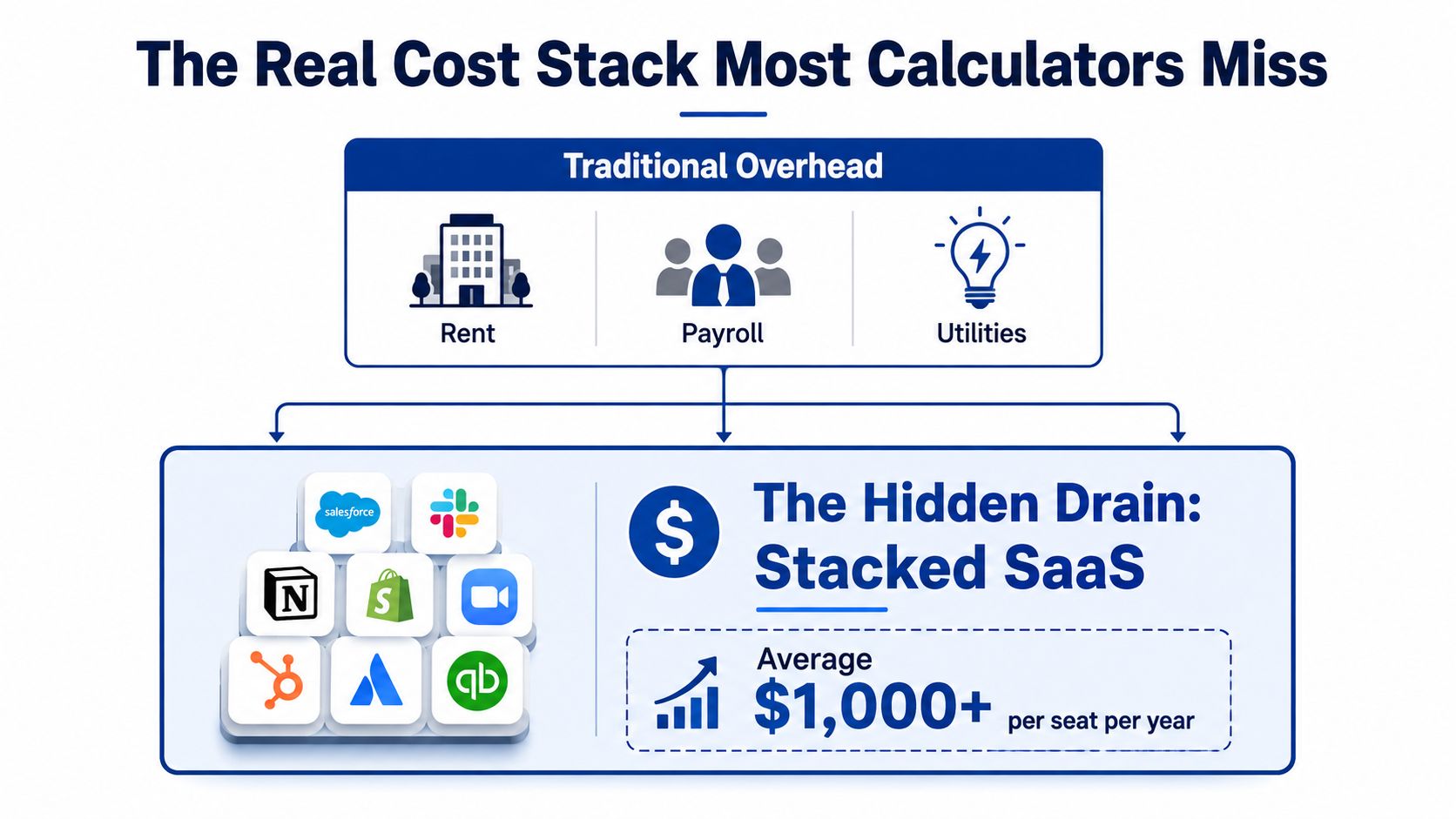
Most overhead calculators stop at rent, payroll, and utilities. That model misses the recurring charges that make a low overhead business expensive to operate: software subscriptions, banking fees, insurance, phone service, payment processing, contractor platforms, equipment, security, and the management time required to keep everything connected.
A more useful model asks what the business owes in a month with zero customers. That test exposes fixed commitments that look harmless individually but become meaningful in aggregate. Recurring software, banking fees, insurance, and phone coverage belong in the same review as rent because they continue whether sales are strong or weak. This overhead framework from OnCallClerk focuses on monthly obligations and overlooked recurring costs.
Remote work reduces some fixed costs, but it introduces its own infrastructure budget. A 2026 remote-work report cited by OnCallClerk says firms should budget 8% to 12% of payroll for remote infrastructure, including equipment, stipends, and security tools. Treat that range as a planning input, not an afterthought.
Run the monthly cost-stack audit
Pull last month's bank and card statements, then sort every recurring charge into these categories:
- Software: Subscriptions, seats, add-ons, and storage.
- Financial services: Banking, payment processing, and transfer fees.
- People: Payroll, contractors, recruiting, and platform charges.
- Risk protection: Insurance, compliance, and security services.
- Communication: Phone, messaging, conferencing, and internet.
- Workspace: Rent, coworking, equipment, and utilities.
- Operations: Bookkeeping, shipping, supplies, and vendor services.
- Remote infrastructure: Equipment, support, stipends, and access controls.
Rank each charge by actual usage, not by how important it sounded during purchase. A tool with many inactive seats deserves attention before a tool used daily by the entire delivery team. A subscription that saves no measurable time should compete directly with staffing and customer acquisition for the same cash.
For broader planning, compare your review with practical cost reduction strategies for 2026, especially guidance that treats recurring overhead as an operating system rather than a one-time cost-cutting exercise.
Schedule a 60-minute overhead audit this week. Repeat it monthly, because subscription creep and small vendor charges return quickly after a cost-cutting push.
Staffing Models That Lower Burn Without Lowering Quality
The cheapest worker is not always the lowest-cost staffing choice. Judge each role by total delivery cost: pay, management time, ramp time, rework, compliance exposure, and errors. A staffing model is lean only when it protects cash and returns meaningful owner hours.
Remote work can reduce physical overhead. A Capgemini Research Institute survey reported in 2021 that 88% of organizations had already realized real-estate savings from remote working, while 92% expected further savings over the following two to three years. The same study estimated average real-estate savings of 32%, with some cases reaching 43%. The remote-work real-estate findings are summarized by World Metrics.
Another source summarized potential savings of about $11,000 per remote worker per year when employees worked remotely an average of 2.5 days per week, alongside a stated annual home-office setup cost of $670. Use those figures as a runway calculation, not a promise. Office savings can fund support capacity, but remote work still requires equipment, governance, clear ownership, and time for quality checks.
| Criteria | In-House | Contractor | Remote-Staffed |
|---|---|---|---|
| Cost per role | Higher fixed commitment | Variable and project-dependent | Often more flexible than local hiring |
| Management overhead | Direct and continuous | Requires scope control | Requires onboarding, QA, and communication |
| Ramp time | Strong cultural integration | Fast for specialized work | Depends on vetting and process maturity |
| IP and compliance risk | Managed internally | Requires strong agreements | Requires secure systems and defined access |
| Scalability | Predictable but slower to adjust | Useful for bursts | Strong for recurring, documented roles |
Match the model to the work
Choose in-house hiring for core product knowledge, sensitive leadership responsibilities, and customer-facing work where continuity affects the offer. Accept the fixed commitment only when the role strengthens differentiation or protects revenue.
Choose independent contractors for defined projects, specialized expertise, and temporary capacity. Set a specific deliverable, deadline, access boundary, and review point. That structure limits management time and makes the contractor's cost easier to compare with a permanent seat.
Choose a remote-staffed team for recurring administrative, customer experience, sales operations, and process work with predictable outputs. Before hiring, document the workflow, handoffs, and quality standard. For a deeper look at outsourcing, see this guide to outsourcing business processes.
Remote hiring is not hands-off. The New York Fed found that remote workers in Fortune 500 call centers answered 12% fewer calls per hour than on-site workers before COVID-19. When on-site workers were forced remote, their productivity fell 4% relative to already-remote workers, suggesting selection effects explained much of the initial difference. The study also found quality problems, especially among inexperienced workers, and lower promotion rates. The New York Fed study explains why worker selection and task design matter. Build a short paid test, define the first quality check, and track output before expanding the role.
List the next three roles you plan to fill. Mark each as recurring or project-based, specialized or repeatable, and customer-facing or internal. Within 24 hours, write a one-page brief for the highest-priority seat, including outcomes, escalation rules, tools, and the weekly hours it should return to the owner.
Hiring and Delegating the Right Roles First
Delegation should follow the revenue engine, not founder exhaustion. Start with a task map that captures every recurring responsibility on your calendar, then place each task into one of three operating groups:
- Executive support: Calendar management, inbox triage, vendor coordination, meeting preparation, and follow-through.
- Customer experience: Onboarding, ticket triage, response management, renewals, and escalation.
- Sales operations: CRM hygiene, outbound preparation, proposal drafting, scheduling, and pipeline maintenance.
The sequence matters because each role removes a different kind of drag. Executive support gives leadership attention back. Customer experience stabilizes delivery. Sales operations protects revenue momentum from administrative neglect.
Your first delegate should usually own a repeatable process with a clear finish line. “Help with operations” is a weak brief. “Prepare the daily appointment list, confirm missing information, update the CRM, and escalate exceptions by a defined cutoff” is assignable work.
Delegation sequence by business stage
| MRR Stage | First Hire | Monthly Cost Range | Weekly Hours Reclaimed |
|---|---|---|---|
| Below $20K | Executive virtual assistant | $1,500 to $2,500 | 12 to 15 |
| $20K to $75K | Customer experience contractor | Not specified | Not specified |
| Above $75K | Sales operations support | Not specified | Not specified |
The figures in the first row come from the provided delegation model. The other stages should be scoped against service-level outcomes, not copied from a generic rate card. Set response-time, accuracy, completion, and escalation measures before you approve the role.
Every delegated function needs three controls:
- A written SOP: Explain the trigger, steps, tools, exceptions, and definition of done.
- A weekly scorecard: Track completed outputs, quality issues, overdue items, and escalations.
- A 30-day review gate: Decide whether to refine the process, change ownership, or stop the engagement.
A visual SOP creator can help turn screen-based processes into documented instructions, but the founder still has to define the outcome and review the first iterations. Documentation isn't busywork. It reduces the number of decisions that return to the owner.
Choose the most impactful open seat, write its one-page brief today, and schedule the first scorecard review before the person starts.
Choosing SaaS Tools That Earn Their Seat
A SaaS subscription earns its place by saving measurable time, protecting revenue, reducing risk, or replacing a more fragmented tool stack. “Everyone uses it” isn't a business case.
The hidden-stack problem is especially serious because multiple subscriptions can create duplicate records, extra logins, and manual reconciliation. Audit software by active usage and workflow ownership, not by whether the product has attractive features.
Apply the four-question screen
Before purchasing, ask:
- Does it replace two or more existing tools? If it adds another layer, demand a clear reason.
- Does it integrate with your system of record? Information shouldn't live in a disconnected island.
- Can a part-time operator run it without you? If every important action requires founder approval, the tool may increase management drag.
- Is the price under 1% of monthly revenue? Use this as a screening rule, not permission to buy.
Reject a tool that fails two or more checks. A low monthly price can still be expensive if it creates training, migration, and oversight work.
Install a kill cycle
Tag every new subscription with its start date, owner, intended use, and metric. At day 90, cancel it if the metric hasn't moved. Don't keep a tool because the team might need it later.
Run a quarterly subscription audit against active logins and actual usage. The provided operating rule sets unused seats above 20% as an immediate downgrade or cancellation trigger. Review integration failures too, because a tool can have active users and still create avoidable work.
Use a simple register with these fields:
- Tool and owner
- Monthly cost
- Active seats
- Workflow supported
- Hours expected to save
- Revenue or risk metric
- Renewal date
- Offboarding steps
The point isn't to build the smallest possible stack. It's to build a stack that a trained operator can run without turning the founder into the integration layer.
Using AI Where It Actually Reclaims Hours
AI creates an advantage when the task is repetitive, the input is clear, and a human can verify the output. It doesn't repair an undefined process. If nobody agrees on what a good customer note, research summary, or internal update looks like, AI will produce faster inconsistency.
The Bureau of Labor Statistics analyzed 61 private-business industries and found an association between remote-work adoption and productivity growth. A 1 percentage-point increase in the rise of remote workers was associated with a 0.08 percentage-point increase in total factor productivity growth. From 2019 to 2021, a 14.9-point increase in remote workers corresponded to about 1.2 percentage points of additional industry-level TFP growth, while an 11.8-point increase from 2019 to 2022 corresponded to about 1.1 points. The BLS analysis explains the industry-level association and its limitations.
That isn't a promise that your AI pilot will improve output. It supports a stricter conclusion: document the workflow, define the output, and measure the result.
Start with verifiable work
Build a one-page SOP for one task, such as:
- Research summarization with source capture.
- First-draft marketing copy with approved messaging.
- Meeting notes with decisions and assigned actions.
- Internal documentation updates based on approved changes.
Run the process manually first, then introduce AI at one step. Keep a human review checkpoint before anything reaches a customer, regulator, client file, or public channel.
Track the time spent before and after in a simple spreadsheet for two weeks. If the workflow doesn't reclaim more than two hours weekly, refine the prompt, change the process, or retire the use case. That threshold comes from the operating plan here, not from a claimed external study.
For legal or compliance-sensitive workflows, keep human judgment in control. An AI legal assistant for business owners may support research and document work, but it shouldn't replace professional review or final approval.
GRIT Virtual Assistants LLC also offers AI-enhanced remote support for research, drafting, documentation, data organization, and workflow implementation, alongside executive, customer experience, sales operations, and process support. Review AI-enhanced remote support compared with another local hire before deciding whether the work belongs with software, a contractor, or an ongoing operator.
Your 90 Day Low Overhead Action Plan
A low overhead business doesn't emerge from one cancellation or one remote hire. It comes from a sequence that makes the cost base visible, moves ownership away from the founder, and measures whether the change created capacity.
Days 1 through 30
Complete the overhead audit. Pull every subscription from bank and card statements, identify active and dormant tools, document remote infrastructure costs, and calculate the current monthly burn. Compare the remote infrastructure line with the 8% to 12% payroll planning benchmark cited earlier, then investigate any major difference rather than assuming it represents efficiency.
At the same time, log your administrative hours. Separate work that requires your judgment from work that only requires reliable execution. Cancel obvious waste, but don't remove a tool until you've identified who will perform the work afterward.
Days 31 through 60
Convert the highest-volume repeatable process into an SOP. Hire or contract for the first role, usually executive support when the founder carries calendar, inbox, vendor, and follow-up work. Deploy two or three automations inside that process, such as intake routing, reminders, status notifications, or document generation.
Set weekly reviews from the beginning. A remote worker who lacks role clarity can create more coordination work than they remove, so test selection, communication, accuracy, and escalation judgment during the ramp.
Days 61 through 90
Measure the operating change. Track hours reclaimed, subscription cost per active user, and contractor output per dollar. The target in this action plan is a 20% reduction in owner administrative time by day 90, but treat it as a management target, not a guaranteed result.
Troubleshoot three predictable failures:
- Worker-selection gaps: Tighten the role brief, add work-sample testing, and increase early QA.
- Subscription creep: Require an owner and success metric for every new tool, then enforce the 90-day kill cycle.
- AI pilots that stall: Attach the pilot to one live workflow, assign a reviewer, and measure time saved rather than experiment count.
Review these three numbers every week: owner administrative hours, recurring overhead owed with zero customers, and output from delegated work. If one worsens, investigate the process before adding more people or software.
GRIT Virtual Assistants LLC provides AI-enhanced remote staffing for executive support, customer experience, sales operations, accounting administration, legal support, and process management. If you want to reclaim owner time without adding unnecessary fixed overhead, visit GRIT Virtual Assistants LLC to explore hourly, retainer, and project-based support.