
Stop fighting distraction with willpower alone. In real workplaces, focus usually breaks because the system keeps interrupting the person, not because the person is lazy or undisciplined. Email pings, loose ownership, meetings, and channel sprawl create a constant switching cost, and that cost shows up fast. Workplace research summarized by the ACM notes that employees needed about 64 seconds on average to recover from an email interrupt and return to prior work pace, while other research estimated workers devote roughly 15% to 20% of their effort to managing interruptions, with some settings losing about 15 to 20 minutes per interruption. A modern industry summary says knowledge workers may face about 275 interruptions per day during core work hours, or roughly one every two minutes, and another estimate puts the average focused session at only 13 minutes and 7 seconds (ACM research on email interruption recovery).
That's why “don t get distracted” works better as an operating model than as a pep talk. Leaders need to identify where attention leaks, protect the hours that matter, route routine work away from the decision-maker, and create team rules that make interruptions less likely in the first place. The point isn't to become perfectly unreachable, it's to build a work environment where your best attention goes to the work that deserves it. For practical tools on that mindset, see Zemith focus improvement tools.
Table of Contents
- 1. The Eisenhower Matrix for Smarter Delegation
- 2. Time Blocking and Schedule Protection
- 3. The Two-Minute Rule and Task Batching
- 4. The Pomodoro Technique with Async Communication Handoff
- 5. Clear Role Definition and Ownership Documentation
- 6. Notification and Communication Channel Management
- 7. Asynchronous Work Norms and Outcome-Based Expectations
- 8. The Attention Audit and Energy Mapping
- 9. Templating, Automation, and Decision Frameworks
- 10. Batch Review and Weekly Priorities Sync
- Top 10 Anti-Distraction Strategies Compared
- Build a Focus System That Holds
1. The Eisenhower Matrix for Smarter Delegation
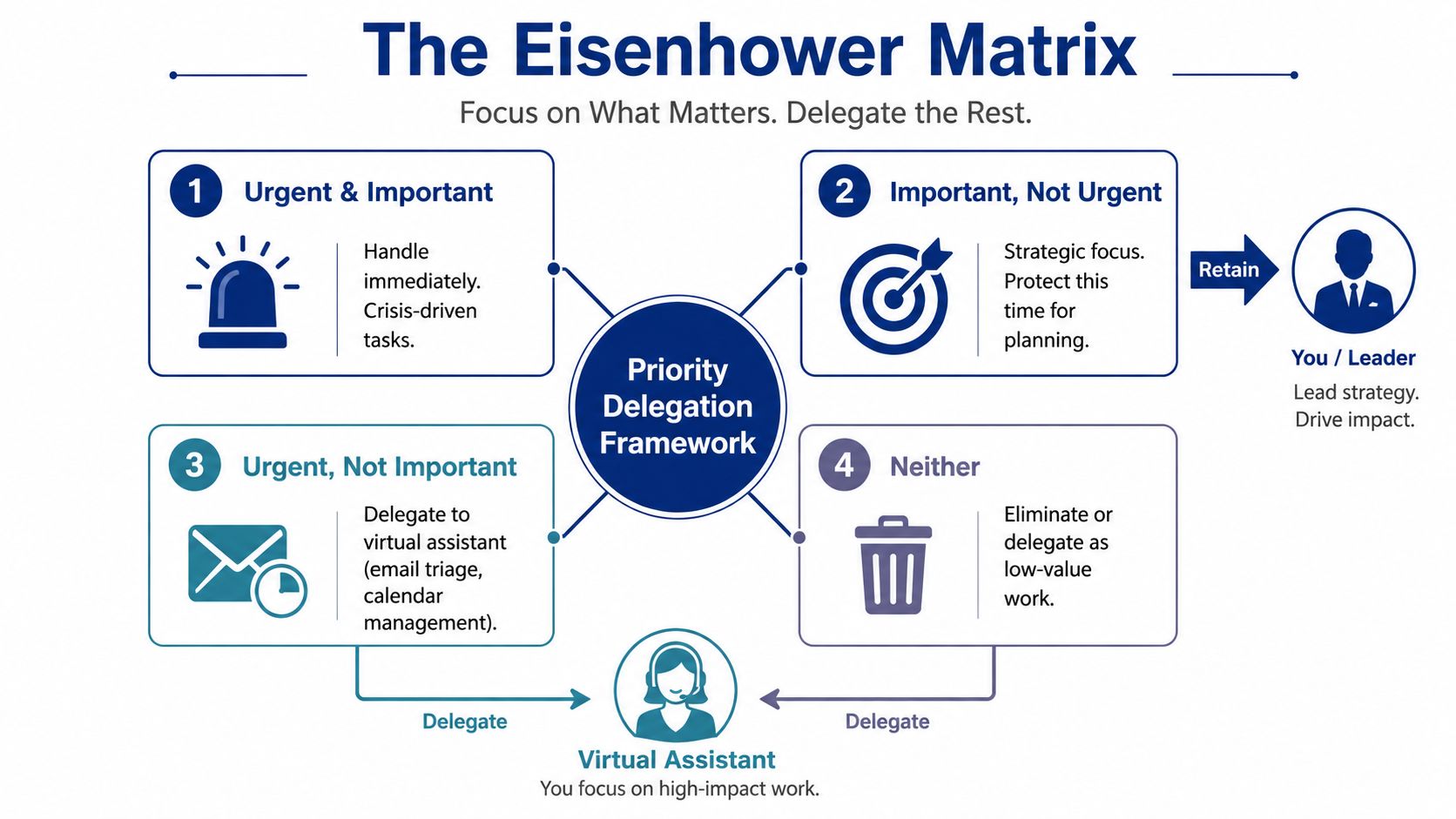
The Eisenhower Matrix is useful because it turns vague overwhelm into a decision. A task is either urgent and important, important but not urgent, urgent but not important, or neither. For leaders, the second quadrant is where real focus lives, and the third and fourth quadrants are where delegation usually pays off fastest.
The trap is treating every incoming request like a leadership priority. An executive who triages email and calendar requests with this framework can protect strategy time, while a sales leader can push urgent but low-value follow-ups to a VA and stay on high-value prospects. A healthcare practice administrator can keep clinical workflow decisions in-house while routing routine patient scheduling out of the leader's day.
Practical rule: if a task repeats and doesn't require your judgment, it's a delegation candidate before it becomes a distraction.
Use it to brief support, not just to sort tasks
A matrix is only valuable if the person helping you understands the logic behind it. Brief your VA on what belongs in quadrant two, because strategic work often gets crowded out by noisy but low-value tasks. That context helps them make better judgment calls on email triage, scheduling, and follow-through instead of sending everything back to you.
- Map recurring tasks: List the work that appears every week, then place each item in a quadrant.
- Protect quadrant two: Guard strategy, planning, and relationship work from reactive interruptions.
- Delegate quadrants three and four: Use a VA for routine coordination, admin, and low-value admin churn.
- Review quarterly: Priorities shift, so the matrix should change with the business.
- Turn it into SOPs: Once the patterns are clear, document them so delegation gets easier next month.
The matrix works best when it becomes part of your operating language. Instead of saying “I'm busy,” you can say, “That belongs in quadrant three, route it to support.” That kind of clarity removes back-and-forth and makes it easier for a remote team to protect your attention.
2. Time Blocking and Schedule Protection
A calendar does not protect focus by itself. The operating rule around it does. Reserve blocks for deep work, planning, and strategic decisions, then give a VA authority to screen meeting requests before they reach the schedule. That combination reduces the number of decisions leaders must make while working.
Use the system differently by role. A real estate broker might reserve a morning for lead follow-up while a VA screens calls and places routine returns into office hours. An e-commerce owner can hold Tuesday and Thursday mornings for planning, with operational requests collected for a review window. A law firm partner may reserve one to two hours for complex case work while a paralegal VA triages urgent matters and queues routine document requests.
The measurement is simple: review how often protected blocks are interrupted and why. If every “quick question” qualifies, the calendar is recording preference rather than protecting work. Define the exceptions in advance, and give the VA enough context to delay or decline requests that do not meet them.
For a practical discussion of calendar boundaries, read Inbox, calendar, and the death of deep work.
Make focus blocks a team operating rule
A focus block works better when colleagues can see and follow the rule. Add it to the shared calendar, explain what it covers during onboarding, and route routine requests through a queue or scheduled review window. The goal is coordinated access, not isolation.
Start with two or three protected blocks a week. Track interruptions for a short review period, then adjust the timing, duration, or exception rules based on what breaks the block.
- Set the boundary: Mark the block clearly and state what work belongs there.
- Define exceptions: Specify which client, operational, or urgent issues can override it.
- Assign a gatekeeper: Let the VA screen invitations, questions, and requests against those rules.
- Create a queue: Capture everything else for a later review window instead of allowing open-ended access.
- Review the pattern: Move blocks when business demands change, not whenever a minor request appears.
Time blocking is schedule protection supported by team norms, delegation, and repeatable rules. The result is fewer reactive decisions and more reliable access to high-value work.

3. The Two-Minute Rule and Task Batching
The two-minute rule is a filter, not a command to react instantly. Handle a low-context task immediately when it takes less than two minutes. If it arrives during strategic work, capture it for later unless delaying it creates a real operational problem. Applying the rule to every interruption turns a useful shortcut into constant context switching.
Task batching gives short requests a defined place in the operating system. A marketing operations VA can collect email replies, social comments, and template sends in one run, while the leader reviews only items requiring judgment. A sales operations VA can group CRM updates, proposal formatting, and follow-up scheduling. An accounting support VA can organize receipts, process invoices, and prepare summaries before the owner reviews payables once daily.
The benefit is continuity. Moving from strategic work to a small administrative request creates recovery work that the task itself does not show. Batching keeps repetitive decisions from scattering across the day and gives delegated support a clear execution pattern.
Turn repeatable requests into a batch workflow
Open-ended access makes every minor request compete with planned work. A shared queue, service-level rule, or review window lets the team hold routine items and escalate exceptions. The trade-off is deliberate delay for low-risk work, in exchange for fewer interruptions and more predictable decisions.
Rule of thumb: repetitive, low-risk tasks belong in a batch window, not real-time interruption mode.
- List your repeaters: Identify the five two-minute tasks you handle most often.
- Separate judgment: Mark which items a VA can complete and which require your approval.
- Template the routine: Create default responses, checklists, and completion criteria with your VA.
- Set one review block: Reserve a daily window for inbox items, approvals, and quick decisions.
- Escalate exceptions only: Flag unusual, urgent, or high-impact requests instead of sending them into focus time.
- Refine monthly: Combine fragmented batches when the workflow still creates too many handoffs.
A batch system works only when the queue, ownership, and exception rules are visible. The work remains, but it stops fragmenting the rest of the day.
4. The Pomodoro Technique with Async Communication Handoff
A timer will not solve a broken communication system. Pomodoro works when it defines who can interrupt, where questions wait, and when the leader becomes available again. The interval creates protected attention, while the handoff keeps routine communication from entering the work block.
Choose one focused interval, then take a real break. The shorter commitment makes demanding work easier to start and sustain. The break must remain a reset, not a second inbox session.
During the focus interval, the leader stays unavailable for non-urgent requests. A VA records questions in a shared queue and releases them during the agreed review window. This rule removes the need to check messages “just in case,” while urgent exceptions still have a clear route.
A healthcare administrator can use Pomodoros for scheduling and patient outreach while the VA queues questions instead of interrupting mid-block. A legal team can align paralegal and attorney focus windows so document requests do not create constant interruptions. An e-commerce operation can reserve escalation access for urgent customer issues and hold routine inquiries for the next review interval.
Build a visible handoff, not a private habit
Use a calendar status, Slack automation, or email auto-reply to show when routine replies are paused. During onboarding, explain the schedule to your VA, including where to place questions, what qualifies as urgent, and when held messages will be reviewed. The system should work even when the leader is not checking every channel.
Start with a few protected blocks each day. Keep non-urgent notes in one shared queue, review that queue only during breaks, and record completed work so progress remains visible. If the queue repeatedly fills faster than it can be reviewed, adjust staffing, priorities, or the communication rule instead of extending every focus block.
Operating rule: if a request is not urgent, it waits in the agreed queue.
Pomodoro is a scheduling component, not a productivity ritual. Its value comes from combining measured attention with an explicit communication handoff, so leaders can focus without leaving the team guessing.
5. Clear Role Definition and Ownership Documentation
Distraction often starts with ambiguity. If no one owns a task, the leader becomes the default point for clarification, follow-up, and cleanup. Clear role definitions and documented SOPs reduce those interruptions because people know where work belongs before a question reaches the top.
A real estate team can define lead routing so brokers, setters, and VAs know how inbound inquiries move. A law firm can assign a paralegal VA ownership of template updates, research support, and discovery organization, which lets the attorney stay on legal analysis and strategy. An e-commerce brand can give an operations VA ownership of fulfillment, returns, and inventory updates, so the owner does not have to track every item by hand.
The gain is not only better delegation. It also cuts repeated questions, reduces handoffs, and lowers the mental load on the whole team. Once the workflow is written down, the work depends less on memory and more on process.
Use remote staffing support as a reference point for how structure reduces friction.
Write the process once, then stop re-explaining it
Practical SOPs are short and specific. They tell the VA what to do, when to escalate, and what done looks like. They also let leaders step back without wondering whether every issue will bounce back into their inbox.
Practical rule: if you have explained the same process three times, the problem is the SOP, not the conversation.
Start with the workflows that repeat most often. Build the first drafts during onboarding, even if they are rough. Add escalation rules so the VA knows when to decide and when to ask. Keep version control tight, because the team needs one current workflow, not three competing ones.
Some teams stop at documentation and still stay distracted. The stronger operating model pairs role clarity with attention measurement, communication rules, and delegated support, so the leader is not the fallback for every routine decision.
6. Notification and Communication Channel Management
Distraction grows fast when every channel has the same priority. Email, Slack, text, calls, Teams, and project tools all ask for attention in different ways, and each switch costs focus. Treat that as an operating-system problem, not a willpower problem.
A leader can route urgent issues through one trusted channel while everything else moves through a daily digest. A customer service team can keep chat as the front door, then let a VA sort unresolved issues and record standard replies. A sales operations team can send inbound lead questions to a VA first, so only qualified meetings and exceptions reach the leader.
The choice is not which app to open. It is what each channel is allowed to carry. If every channel can handle every message, the system turns into noise. If each one has a job, the team works faster and feels less interrupted.
Set channel rules that reduce switching
Start by naming the purpose of each channel. One lane for emergencies. One lane for routine work. One lane for scheduled review. Then match response times to the channel, not to the sender's urgency.
- Map the current mess: Count how many channels you monitor now.
- Keep one emergency lane: Reserve it for genuine crises only.
- Route routine requests: Use rules and auto-responders to send work into the VA queue.
- Create review windows: Check email and chat at fixed times.
- Pressure-test urgency: If too many messages are marked urgent, the rule is too loose.
The trade-off is clear. Stricter channel control can feel slower in the moment, but it cuts interruptions, reduces false alarms, and keeps attention on work that moves. For remote teams, that usually means fewer pings, fewer follow-up questions, and fewer decisions made in the wrong place.
Leaders who want more focus usually need fewer open channels, not more speed across all of them.
7. Asynchronous Work Norms and Outcome-Based Expectations
Async work reduces distraction when the system is built around outcomes, not constant check-ins. A VA should know what done looks like before the work starts, so the leader does not need to hover, clarify, or chase updates at every step. That keeps work moving without turning every task into a live conversation.
A marketing ops VA can prepare a monthly campaign status report by Friday and send it without a meeting. A sales VA can update stale deals using attached criteria and report back after the list is clean. An accounting VA can batch weekly invoicing and submit it for review by Monday morning. In each case, the leader cares about the result, not real-time supervision.
The trade-off is simple. Async breaks down when the handoff is vague. People then fill the gap with messages, meetings, and repeated course correction. Strong norms reduce that friction because they force the leader to define the result before work begins.
Practical rule: define the outcome, deadline, and success criteria before you hand off the task.
The best async teams treat writing as the coordination layer. Daily or weekly written updates replace status meetings, and feedback moves through email, Loom, or notes instead of live correction. Accountability stays visible, but interruptions fall because the record is already there.
A few rules make that system hold.
- Write the result first: State what complete looks like before listing the steps.
- Use written updates: Keep progress visible without booking a call.
- Allow method freedom: Let the VA choose the path if the outcome is clear.
- Reserve sync for blockers: Meet only when the work needs discussion.
- Correct asynchronously: Give feedback without forcing a live interruption.
Remote teams also need a clearer handoff between personal habits, team norms, and delegated support. A leader can protect focus, a VA can own the routine follow-up, and SOPs can handle the repeatable parts. That combination reduces context switching without pretending every task can be fully async.
Async norms work best when they fit the actual trade-off. They give people room to work in their best hours, but they also require discipline about what belongs in chat, what belongs in writing, and what should wait.
8. The Attention Audit and Energy Mapping
Distraction is usually an operating-system problem before it becomes a willpower problem. An attention audit shows which tasks, interruptions, and habits consume energy without producing comparable value. Energy mapping adds timing: it identifies when your thinking is strongest, so demanding work does not compete with routine administration for the same hours.
An executive may find that meetings fill the calendar while strategy work is repeatedly displaced. A sales leader may discover that email breaks prospecting into fragments. A healthcare administrator may see that morning focus is spent on inbox maintenance instead of clinical decisions.
Start with observation, then redesign the system.
Track one week before changing the schedule
Log at least five distinct interruption sources during a single week. Include email, Slack, calls, nearby conversations, meetings, and self-generated checking. If you can name fewer than three sources, your tracking window is too short or your awareness is still unclear.
For each work block, record the task, the interruption, its source, and how strong your focus felt. A paper log works, as does a digital tool. The point is to capture enough operating reality to make better scheduling, delegation, and environmental-control decisions.
A VA can maintain the log, group recurring interruptions, and flag patterns while the leader reviews the decisions that require judgment. That division keeps measurement from becoming another task that fragments attention.
Use the results in this order:
- Remove avoidable triggers: Silence nonessential alerts, close unnecessary tabs, and protect the workspace during high-focus periods.
- Delegate repeat interruptions: Route routine follow-up, status requests, and inbox sorting to the VA when the responsibility is clear.
- Protect peak energy: Reserve your strongest hours for strategy, decisions, or other work that depends on sustained concentration.
- Set a lower-energy queue: Place administrative tasks in periods when deep thinking is harder.
- Review quarterly: Workload and seasonal demands can change the pattern.
The audit does not need to become a perfect behavioral study. It needs to expose the leaks clearly enough for team norms, delegated support, SOPs, and schedule controls to work together. Once the pattern is visible, distraction becomes a system-design problem with practical changes to test.
9. Templating, Automation, and Decision Frameworks
Repetitive decisions drain focus faster than repetitive tasks. Remove routine judgment from the loop with templates, routing rules, automation, and clear exception paths.
A real estate team can use response templates for prospect outreach, follow-up, and listing inquiries. An e-commerce operation can use Zapier or Make to classify incoming requests and route each type to the right VA. A VA-facing workflow can handle Tier 1 questions, send approved replies, and escalate only cases that fall outside the rules. A legal team can use a decision tree to separate independent research from matters requiring attorney input.
Automation should support a documented process. It can auto-respond to common email patterns, create tasks from approved requests, or assign work by category. The trade-off is control versus flexibility. Tight rules reduce interruptions, but unclear or outdated rules create bad handoffs. Test the workflow with real interactions before expanding it.
Use the first month of support to test and refine the system with productivity tool guidance.
Codify the common path
Give the VA authority over routine cases, while leaders keep decisions involving risk, exceptions, or customer nuance. That division protects attention without hiding important judgment inside an opaque workflow.
- Inventory repeat decisions: List common questions, replies, and routing choices.
- Template the common path: Leave unusual cases for human judgment.
- Automate predictable actions: Trigger replies, assignments, and status updates only when the rule is clear.
- Document escalation: State when the VA or automation must stop and seek review.
- Test with real interactions: Refine templates and rules using actual messages and cases.
- Review quarterly: Update the system as customer needs and processes change.
The goal is a small operating system for recurring work. Clear rules let automation handle predictable steps, let the VA resolve routine requests, and keep the leader focused on exceptions that require judgment.
10. Batch Review and Weekly Priorities Sync
A weekly sync turns scattered decisions into a defined operating rhythm. The leader and VA review progress, remove blockers, and set priorities in one scheduled conversation. The remaining workdays stay focused on execution instead of repeated decision requests.
An executive and VA might meet each Monday to confirm priorities, then work independently. A sales operations team could use a Friday review to assess the pipeline and plan next week's outreach. A healthcare practice may reserve a weekly meeting for scheduling policy questions and logistics. The format changes by team, but the purpose remains consistent: give decisions a known place to happen.
Predictability reduces unnecessary interruptions. Team members can collect non-urgent questions for the review instead of treating every uncertainty as an emergency. Leaders should still define exceptions that require immediate escalation, since strict batching can delay urgent customer or operational issues.
For a repeatable setup, use this weekly reclaim checklist for founders who want their calendar back.
Make the sync short and structured
Treat the meeting as a planning checkpoint, not another inbox. A shared agenda lets both sides prepare asynchronously, while a short VA summary gives the leader enough context to decide without reconstructing every detail. Record decisions in the team's task system, then update the relevant SOPs when a new pattern appears.
- Keep the time fixed: Use the same day and time each week.
- Use a shared agenda: Add decisions, blockers, and priority changes before the meeting.
- Set a practical limit: Keep the discussion brief enough to preserve working time.
- End with ownership: Assign every priority to one clear owner with a defined next action.
- Define escalation: State which issues cannot wait for the weekly review.
- Protect the rhythm: Skip only when the team has a clear replacement process.
The weekly review stabilizes the rest of the week. Personal focus habits, team communication rules, and delegated preparation work together, so attention is protected by the operating system rather than by willpower alone.
Top 10 Anti-Distraction Strategies Compared
| Strategy | Implementation complexity | Resource requirements | Expected outcomes | Ideal use cases | Key advantages |
|---|---|---|---|---|---|
| The Eisenhower Matrix (Priority Delegation Framework) | Medium, requires honest task categorization and periodic recalibration | Low–Medium, leader time to map tasks, brief VA | Clear delegation decisions, protected strategic time | SMB leaders who need to delegate routine work to VAs | Reveals delegation opportunities, reduces decision fatigue |
| Time Blocking and Schedule Protection | Medium, requires discipline and enforcement | Medium, VA as calendar gatekeeper, calendar tools | Predictable focus blocks, fewer context switches | Leaders needing uninterrupted deep work (CEOs, founders) | Preserves strategic time, reduces cognitive load |
| The Two-Minute Rule and Task Batching | Low, habit change plus batching setup | Low–Medium, VA executes micro-tasks, templates | Less to-do clutter, higher processing efficiency | High-volume routine roles (ops, sales, admin) | Eliminates micro-task overhead, improves throughput |
| The Pomodoro Technique with Async Communication Handoff | Medium, ritual discipline and async norms | Low–Medium, timers, VA queues, communication signals | Improved focus rhythm, minimized real-time interruptions | Individual contributors and teams tolerating async windows | Boosts sustained attention, formalizes async handoff |
| Clear Role Definition and Ownership Documentation (SOPs) | High, upfront documentation and ongoing maintenance | Medium–High, time to create SOPs, collaboration tools | Fewer clarifications, scalable onboarding, consistent execution | Teams scaling or with recurring workflows (operations, legal) | Creates autonomy, reduces miscommunication and rework |
| Notification and Communication Channel Management | Medium, requires setup and stakeholder buy-in | Medium, filters, escalation rules, VA monitoring tools | Reduced notification fatigue, prioritized escalations | Leaders facing many channels (email, Slack, phone) | Minimizes interruptions, centralizes urgent alerts |
| Asynchronous Work Norms and Outcome-Based Expectations | Medium–High, culture change and clear outcome definitions | Medium, written outcomes, async tools, trust-building | Fewer status meetings, outcome-focused execution | Distributed/remote teams and autonomous VA relationships | Eliminates sync overhead, increases autonomy and focus |
| The "Attention Audit" and Energy Mapping | Medium, one-week data collection and analysis | Low–Medium, time-tracking tools, VA assistance for logging | Objective insight into time sinks, optimized scheduling | Leaders unsure where attention is leaking | Data-driven prioritization, guides targeted delegation |
| Templating, Automation, and Decision Frameworks | High, design and automation setup, periodic review | Medium–High, automation tools, template library, VA execution | Fewer repeated decisions, scalable consistent responses | High-repeatability processes (customer service, sales ops) | Reduces decision fatigue, increases consistency and scale |
| Batch Review and Weekly Priorities Sync | Low, establish a fixed cadence and agenda | Low, weekly 30–60 min sync, shared docs prepared by VA | Aligned weekly priorities, minimized mid-week interruptions | Leader–VA pairs needing regular alignment | Batches coordination, creates predictable rhythm |
Build a Focus System That Holds
The most effective way to don t get distracted is to treat focus as a system design problem. Start with one week of attention tracking, then protect a small number of deep-work blocks and make those blocks visible to the team. Consolidate communication into clear channels, document the recurring workflows that keep pulling you off task, and give the team an async review rhythm so decisions don't have to happen in real time.
Delegation works best when it comes with ownership, escalation rules, and measurable outcomes. A VA can handle inbox management, scheduling, customer support, sales operations, process coordination, and follow-through, but only if the rules around that work are clear. When leaders pair support with SOPs and channel discipline, they get more than time back. They get fewer interruptions, fewer dropped handoffs, and a calmer operating cadence.
If inbox load, scheduling conflict, customer follow-up, sales coordination, or repetitive admin keeps breaking your focus, structured remote staffing can help. GRIT Virtual Assistants LLC provides AI-enhanced remote staffing that combines human judgment with operational support, so leaders can move routine work out of the attention path and protect the hours that matter most. For more practical ideas on building a focused work setup, explore focus improvement techniques that work.
If you're ready to turn focus into a repeatable operating system, visit GRIT Virtual Assistants LLC and see how their remote staffing model supports calendar control, inbox management, workflow documentation, and day-to-day follow-through. The right support can move routine work out of your attention path so you can stay on the decisions that grow the business.